Web
Warning
Warning! Web support is experimental, and not all engine features are implemented (such as C# support).
Technical information
Flax supports building games for Web that can be run in a browser. Engine with game code are compiled into WebAssembly and use WebGPU for rendering.
Browser support
Flax uses various features on Web that ensure the final build is fast and small:
- WebGPU - rendering API used to draw,
- Fixed-width SIMD - Single Instruction Multiple Data (SIMD) extension to WebAssembly,
- JavaScript Promise Integration - JSPI allows to call async code from synchronous WebAssembly which is used by WebGPU async APIs.
The current browser support coverage:
| Browser | Minimum Version | Notes |
|---|---|---|
| Chrome/Edge | v137 (May 2025) |
|
| Firefox | v147 (Jan 2026) |
Requires flag javascript.options.wasm_js_promise_integration set in about:config. |
| Safari | Safari 27 (Sep 2026) |
JSPI support appeared first in the Technology Preview 238. |
Flax outputs JavaScript code that checks for the minimum browser version and warns user on startup that the browser needs an update in order to run a game. The same applies to other features such as WebGPU or JSPI.
Tip
Game code can access browser name/version info from WebPlatform::GetUserAgent.
JSPI vs ASYNCIFY
JSPI is a relitivly new API thus not all browsers support it by default thus it's possible to build engine with old-compatible Asyncify and lower the requrements hovewer recent browsers contain more stable and usable WebGPU implementation which is desired sinc it's also relatively new API. You can fork engine and change WithAsyncify to 1 inside GraphicsDeviceWebGPU.Build.cs to build Web game with wider browser support at cost of significantly larger output website files.
Limitations
- C# scripting support is not implemented yet, which means games can use only native C++ scripting (Visual Scripting relies on C# integration).
- Video playback is not yet implemented.
- Audio playback might be delayed until user interacts with a website due to browser security policy.
- By default, game runs on a single thread due to compability/safety issues. Multi-threading can be enabled manually (see section below).
- See more Portability Guidelines.
WebGPU
WebGPU is a web graphics API that provides low-level and high-performance access to modern GPU features such as Compute Shaders and Indirect Drawing.
Limitations and notes:
- Texture format support varies across devices thus use
GPUDevice::Instance->GetFormatFeatures(PixelFormat::FORMAT_TO_USE)to check if specificFORMAT_TO_USEhas a given flags set, - By default, engine packs textures using
Basis Universalformat and converts image on a fly to the runtime format which allows a single game build to run on both mobile and desktop GPUs. - Use browser console output to inspect any problems with rendering. Non-release builds auto-crash after 20 unhandled errors for inspections.
- Shaders are compiled with
glslangintoSPIRVand then withtintintoWGSL. - Use WebGPU Inspector or RenderDoc to debug rendering.
RenderDoc debug command for Chrome:
set RENDERDOC_HOOK_EGL=0 && "C:\Program Files\Google\Chrome\Application\chrome.exe" --no-sandbox --disable-gpu-sandbox --disable-direct-composition --gpu-startup-dialog --enable-dawn-features=enable_renderdoc_process_injection,disable_symbol_renaming,use_user_defined_labels_in_backend
Threading
Flax has support for multi-threading in browsers via pthread API in Emscripten. Hovewer due to security concerns with SharedArrayBuffer due to various exploits, the use of multiple threads for the Web has drawbacks, including the requirement of server-side headers with complete cross-origin isolation. It restricts usage of ads, and third-party integrations on the website hosting your game, which limits the usability.
By default, Flax compiles in a single-threaded mode, which isn't as performant but doesn't require overhead to run game on Web, including on popular Web hosting/publishing services. You can fork engine and edit Flax.flaxproj to use threads on Web by enabling it:
"Web": {
  "Threads": true,
},
Development Setup
Flax Editor supports building game for Web on both Windows, Linux and Mac. Follow these steps to setup your development PC for building game for Web platform:
- Install Emscripten (min. ver
4.0but recommended latest5.0), - Set
EMSDKenvironment variable to point to Emscripten SDK installation folder, - If using engine from Flax Launcher, ensure to download Web (target platform) files,
- Adjust project scalability (eg. Motion Blur and SSAO might be too intense visuals to run across all hardware),
- Use Game Cooker to build game for Web.
Use Release configuration only for final game build as it doesn't have various tools and no logging inside browser console.
Serving the files
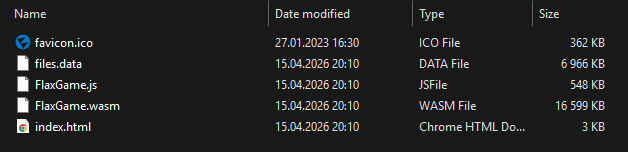
Flax builds a standalone website for easy game hosting that includes index.html, JavaScript files, WebAssembly files, files.data with game content and favicon.ico. The output files are ready to be zipped and uploaded to the popular Web publishing stores such as itch.io. Game can be self-hosted too, as long as server complies with Emscripten guidelines.
Output game can be tested locally emrun tool. See this documentation to learn more about it. Alternatively, you can run command:
python -m http.server
Then open browser page:
http://localhost:8000/
Tip
Use developer console inside the browser (F12 or Ctrl + Shift + I) to inspect engine or game logs available in Development or Debug builds.
Build options
| Property | Description | ||||||||
|---|---|---|---|---|---|---|---|---|---|
| Output | The built game output folder (relative to the project). | ||||||||
| Show Output | If checked, after building the output folder will be shown in an Explorer. | ||||||||
| Configuration Mode | Game building mode. Possible options:
|
Platform settings
| Property | Description | ||||||||||
|---|---|---|---|---|---|---|---|---|---|---|---|
| Custom Html | The custom HTML template for the game page. | ||||||||||
| Textures Compression | The output textures compression mode. Possible options:
|